

This is an old revision of the document!
Introduction to LBackup
LBackup is a backup system, aimed at systems administrators who require reliable backups of local and remote systems with minimal fuss.
Each time LBackup is executed a snapshot of the backup source directory is generated. Backups are incremental and take advantage of hard-links to reduce the disk usage requirements of your backup set(s).

To see LBackup in action you may be interested in viewing the screencasts.
LBackup is configured with configuration files. Backup and reporting is initiated via the command line. Simple automated backups may be configured within 10 minutes (excluding the time required for testing). With regards restoring files from a backup set, LBackup offers great flexibility. This is because the backup snapshots are presented like any other files on your operating system.
A majority of the code base has been tested for over 5 years. Although LBackup is pre-release beta software, it is considered to be stable for deployment and is currently deployed across the globe by various institutions. This adoption is primarily due to advanced error reporting, readily available support and configuration flexibility.
LBackup is disk-to-disk backup front end to rsync. This means that LBackup is easily able to handle the backup of data sets well in excess of 1TB. However, if rsync is not preserving meta data required by your backup policy, then LBackup will not resolve this issue. Instead, you will need to install or compile a copy of rsync for your system(s) which preserves the meta data required by your backup policy. This is particularly important if your backup policy requires the preservation of ACL's.
The primary aim of the LBackup project is to be make reliable backups easier for system administrators. In addition, the LBackup project also aims to be a flexible and scalable backup solution.
LBackup is ideal backup tool in the following situations (just to name a few) :
- Network backup of running virtual machines, with auto-snapshots enabled.
- Network backup of file servers, including Mac OS X Server.
- Network backup of your home folder, even if it is encrypted with file vault.
The LBackup project is completely open. As such this documentation is editable by you. LBackup it's self is editable and you are able to see and contribute to the direction of the project. Visit the contribute page if you would like to make LBackup even better.
About this Documentation
Just like LBackup this documentation is able to be edited. If you find any errors or omissions within the documentation then you are welcome to improve the documentation.
The aim of this documentation is to provide developers and end uses alike with information on LBackup's capabilities, as well as details regarding the configuration of LBackup.
Finally, this documentation contains various references to other tools so that even if LBackup is not quite what you are need, this sight may point you towards the tool which will do what you want.
LBackup Purpose
- LBackup is aimed at the backup of user data.
- LBackup is intended to make the deployment of a robust backup system quick and easy, while remaining flexible enough to integrate into your existing information infrastructure.
- LBackup is primarily aimed at system administrators who deal with a lot of data. This makes it ideal for research and development departments, universities and storage companies.
- Preservation of Mac OS X meta data such as ACL's, resource forks and POSIX permissions.
- Ensure digital assets are safe.
LBackup Support
Support for LBackup is available from Lucid Information Systems. If you require assistance with the setup or configuration of LBackup then contact Lucid.
Lucid also offers digital information processing, and storage consultation services. Should you be looking for a managed storage solution, then visit the Lucid pro storage page.
• View further information on LBackup support
What LBackup is Not
- LBackup is not intended for large scale deployment, unless used in combination with some sort of file system management tool.
- LBackup is not inteded for full system backups.
LBackup Features at a Glance
- Encrypted Backups (Transport and Storage)
- Hard Links (Saving Space)
- RSync Back-end (Reliable)
- Support for Various Mac OS X Meta Data (eg. Preservation of ACL's)
- Pre and Post Actions (such as mounting and un-mounting volumes)
- Dynamic Multi-Destination Support (multiple backup locations)
- Full installation and configuration is possible via a command line interface.
Alternatives to LBackup
- If you are interested in performing a bootable backup of Mac OS X system have a look at Carbon Copy Cloner, SuperDuper, or the Full System Backup page.
- If you are interested a very simple backup solution then consider some of the various *NIX commands. A couple of *NIX tools to consider are afio and tar. When combined with tools such as find you will be able to quickly construct a customized backup solution. If you end up constructing a custom backup script or command we encourage you to submit these to the LBackup project. This is because we are constantly looking for ways to make LBackup more flexible.
- Dirvish has some unique approaches to backup management and is worth a look.
- If you like the sound of RSync, but do not really want to edit a text file to configure your backups, then ripcordbackup, arRsync, RSyncX (tutorial) or EasyRsync may be worth a look. In addition, on LINUX there is GADMIN-RSYNC.
- If you would like to just use RSync, then there are plenty of tutorials and tips available, to help get you started.
- If you are having difficulty keeping an encrypted image in sync across a set of networks, consider duplicity.
- Rsnapshot is command line tool which produces hard linked backups like LBackup.
- Link-Backup is a command line tool which deals with file and directory renames. The LBackup team are working to integrate Link-Backup with LBackup in the future.
- rdiff-backup is a command line tool which simultaneously supports both push and pull network backup strategies. In addition, rdiff-backup is very good at only storing the changes between different version of a file. This results in drastic reductions in the amount of space required for the backups when using rdiff-backup in under certain circumstances.
- TimeMachine is bundled into Mac OS X 10.5 and later and provides an intuitive GUI for restore operations.
LBackup Features in Depth
Designed for User Data Backup
LBackup is designed to perform backups of user data.
Although full system backups are possible by utilizing the post script feature, LBackup is not specifically designed to perform bootable Mac OS X system backups. Further information regarding the creation of bootable Mac OS X backups is available from the full system backup page.
License
LBackup is licensed under the GNU GPL.

Image copyright©2005 Aurelio A. Heckert. Copyleft: this work of art is free,
you can redistribute it and/or modify it according to terms of the Free Art license.
Full Backup Tree / Hard Links
LBackup creates snap-shot trees using hard-links to save disk space. A snap-shot tree is a collection of file system snap-shots each of which mirror the backup path at specific points in time.
An advantage of a snap-shot trees is that it is very quick to located files or directories when preforming a restore.
Archiving, of snap-shots may be enabled as a separate step if you require a backup archive. This step can be automated with post scripts. If you are looking for a backup tool which generically supports the creation archives then consider rdiff-backup.
The tree backup structure makes the creation of backup chains simple.
This write-up explains some other approach's for performing Full Backup Tree / Hard Link backups.
Encryption
LBackup supports the backup of FileVault data to multiple encrypted disk images.
It is possible to configure LBackup to store backups in encrypted independent redundant images. These encrypted images may reside on local media which is then manually taken off site. Alternatively, the data may be transported off site automatically via SSH.
- SSH provides encryption for all data transferred across a network or set of networks.
- Encryption of data (source or destination) may be encrypted using a variety of on the fly encryption systems.
• View further information on LBackup encryption
Reporting
LBackup includes a built-in email reporting functionality. However, there are alternative reporting systems readily available if you would prefer not to use an email backed for your backup reports. These alternatives are particularity useful if you are deploying multiple backup servers which are each configured with thousands individual network backups.
Email Reporting
Email reporting is ideal if you are managing a handful of backups. Log files are generated whenever a backup occurs. These logs are emailed to an address specified in the mail configuration file. If an error occurs during a backup then the log file will immediately be sent to the email address specified in the mail configuration file. Alternatively, log files may be emailed at predefined times though scheduling tools such as CRON or LaunchD.
Reports arriving via emails may be processed by log checking scripts which may intern generate and flag logs for later analysis. Such scripts can also be set to listen and expect reports. If these reports are not received then an administrator may be notified.
• View further information on LBackup reporting
RSync Back-end
LBackup copies files between devices using rsync. LBackup is just a wrapper to rsync. The LBackup configuration files make it quick and easy to specify a backup and to then automate this backup with a scheduling program such as CRON or LaunchD.
Mac OS X Meta Data Support
LBackup supports the preservation of various Mac OS X specific metadata such as ACL's and resource forks, provided the backup has configuration conforms with the following criteria :
- The backup is performed by rsync v3 and is compiled according to these instructions.
However, keep in mind that you must always test your backups, to ensure that the data required by your backup policy is preserved and that you also understand how to restore the data.
Pre and Post Actions
LBackup provides pre and post hook scripts for each backup configuration. This allows you to mount backup drives or source drives as required. As well as the ability to perform any other actions before or after a backup takes place. It is important to note the security implications of this feature. Make sure that the configuration files and folders are only writable by authorized system administrators.
Dynamic Multi-Destination Support
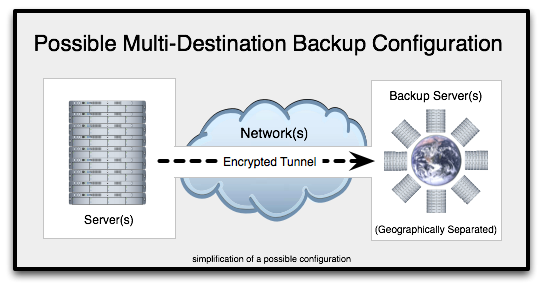
LBackup supports dynamic destination backup via a vast array of scripting languages. This means that with LBackup you have great control over the destination of your backups. LBackup may be configured to backup to multiple local and remote destinations. If you require a remote backup location then Lucid offers remote backup services.
You can configure LBackup to cycle though multiple backup destinations, backup to all destinations, backup only to destinations which are currently available or which currently have the best attributes such as highest data transfer speeds.
Automation
LBackup is able to be configured so that it runs automatically. This is accomplished by utilizing a scheduling utility, such as CRON or LaunchD. Using LaunchD to initiate backups means that a variety of system events may act as a trigger. For example you may want to initiate a backup begin when a hardware device is mounted into the file system, as discussed in the articles listed below.
Below are a couple of OS X GUI interfaces for the scheduling utilities mentioned above.
On the topic of automation, Anacron is an OS X utility which will check to see if there are any scheduled jobs which are outstanding (have not been run). This may be useful if you have scheduled tasks set on machine which is not running 24/7.
Finally, the network backup page contains information on leveraging an SSH Agent in conjunction with Cron to configure automated backups.
Why Open Source Backup?
Using an open source back up solution means that the software may be freely customized to suite your requirements.

Open source backup is further discussed in this artilce published by Infostor.
Development History
LBackup was originally developed by Lucid Information Systems. Development started in 2002 before Lucid was officially formed. In August 2007 LBackup was re-released under the GNU GPL.
Today LBackup is maintained by the LBackup team.
Trying to find reliable backup solutions was one of the reasons Lucid Information Systems was originally founded.
Lucid continues to host the primary download mirror and also the LBackup documentation. In addition, various people working with Lucid are contributors to the LBackup project.